

Home >> DVD Creator >> DVD Creator
How to Create Photo Video Slide with Photo DVD Maker step by step?
How to Create Photo Video Slide with Photo DVD Maker step by step?
Photo DVD Maker helps you create photo album on DVD disc playable on TV, website, mobile devices such as Apple iPod, Sony PSP, cellular phone. With few clicks, Photo DVD Maker creates a professional-looking photo slide show with background music, Pan&Zoom and transition effects.
Photo DVD Maker supports DVD, SVCD and VCD 2.0, MPEG, MPEG-4, FLV (Flash for Video) as the output format, supports over 360 amazing transition effects, Pan & Zoom, anti-flickering filter, supports adding background music directly from music CD and adding text Macro such as photo album name, photo file name, date, etc. It supports sub-title and art clips for each photo slide which adds amazing special effects for the slideshow. It also supports voice recording, annotation, audio music trimming and timeline control for easier audio/photo synchronization.
Step 2. Download and Install AnvSoft Photo DVD Maker
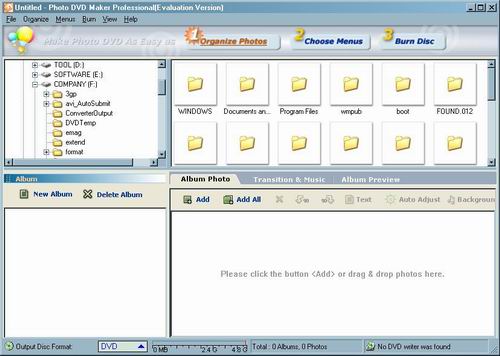
Download the trial software, when this is finished install and run the software, a window like the one shown below should now be on your screen.
Step 3. Launch AnvSoft Photo DVD Maker
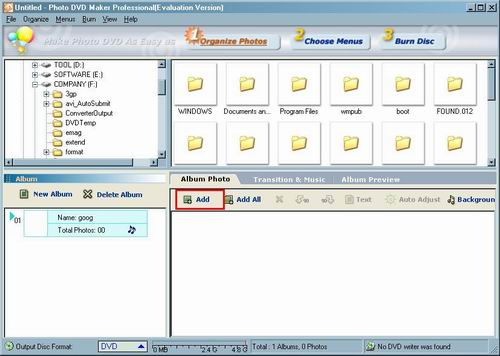
Launch Photo DVD Maker, click "Add". Add one or more pictures.
Step 4. This dialog shows the contents table of the the pictures
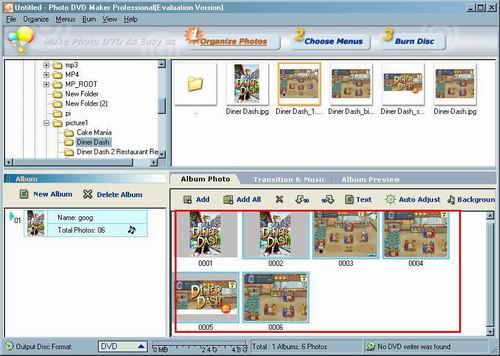
This dialog shows the contents table of the the pictures to be converted.
Step 5. Add background music
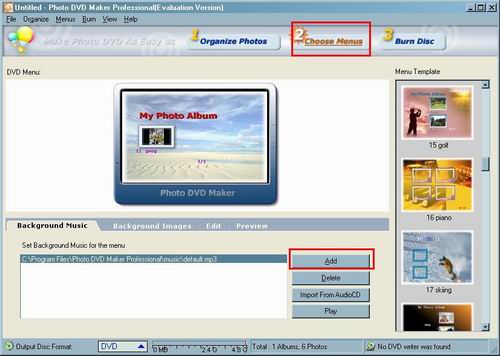
Click "Choose Menus" and then click "Add" to set background music for the menu.
Step 6. Show your favourite music
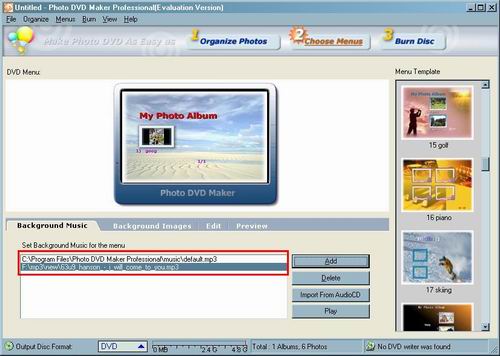
This dialog shows the contents table of the the music to be converted.
Step 7. Adjust and change setting
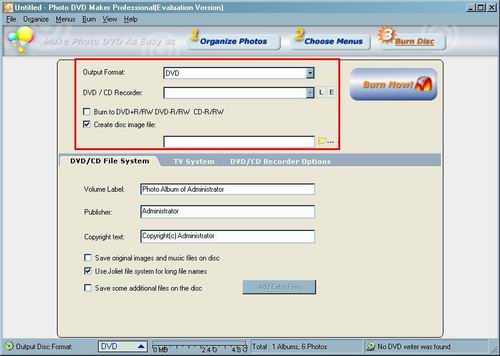
Default settings which can be found on the panel of the main window. They can be adjusted or changed manually according your needs. If you don't know what the setting means, its best to leave the defaults alone.
Step 7. Encoder and Burn DVD
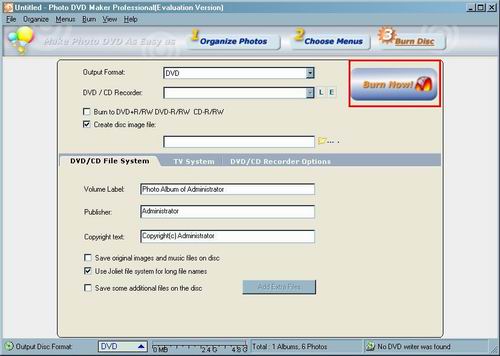
If you've followed all the other steps correctly all you have to do now is press "Burn Now!' and before you can say "Robert"s your father's brother" the process will be well underway.
Related Software
 Free Blu-Ray DVD Burneris another free software for you. It can help you burn your data into Blu-Ray DVD disc. It has part function of Okoker CD&DVD Burner. Free Blu-Ray DVD Burner is designed for burning Blu-Ray DVD disc, and can not burn other DVD disc. Okoker CD&DVD Burner can burn almost all DVD disc and it has all the features of Okoker HD-DVD Burner.
Wondershare MPEG to DVD Burneris a professional MPEG to DVD converter program. It can easily convert MPEG to DVD with very flexible video enhancement options.
DVD Creator for Mac OS Burn regular video,FLV video and HD video to a DVD. Create DVD Slideshow with customizable DVD menu. Support video cropping,trimming and seting video effect etc.
Wondershare AVI to DVD Burner a professional AVI video to DVD-authoring program. It can easily burn AVI files to DVD for backup and enhancement.
Xilisoft DVD Creator for Mac provides an easy and fast way to convert AVI to DVD, MPEG to DVD, DivX to DVD, burn DVD folder to DVD, ISO file to DVD for Mac OS to play on portable or home DVD player.
Wondershare WMV to DVD Burner is a powerful WMV video to DVD-authoring program. It can easily burn WMV to DVD with very flexible video enhancement options.
imtoo DVD Create for Mac is powerful Mac DVD burning software which helps you convert AVI to DVD, MPEG to DVD, DivX to DVD, and burn the DVD movie to DVD, or burn DVD folder to DVD, DVD ISO file to DVD for Mac!
Wondershare Video to DVD Burner is a very powerful video to DVD converter that can burn regular video files to DVD for backup and enhancement.
Free Blu-Ray DVD Burneris another free software for you. It can help you burn your data into Blu-Ray DVD disc. It has part function of Okoker CD&DVD Burner. Free Blu-Ray DVD Burner is designed for burning Blu-Ray DVD disc, and can not burn other DVD disc. Okoker CD&DVD Burner can burn almost all DVD disc and it has all the features of Okoker HD-DVD Burner.Wondershare MPEG to DVD Burneris a professional MPEG to DVD converter program. It can easily convert MPEG to DVD with very flexible video enhancement options. DVD Creator for Mac OS Burn regular video,FLV video and HD video to a DVD. Create DVD Slideshow with customizable DVD menu. Support video cropping,trimming and seting video effect etc.Wondershare AVI to DVD Burner a professional AVI video to DVD-authoring program. It can easily burn AVI files to DVD for backup and enhancement.Xilisoft DVD Creator for Mac provides an easy and fast way to convert AVI to DVD, MPEG to DVD, DivX to DVD, burn DVD folder to DVD, ISO file to DVD for Mac OS to play on portable or home DVD player.Wondershare WMV to DVD Burner is a powerful WMV video to DVD-authoring program. It can easily burn WMV to DVD with very flexible video enhancement options. imtoo DVD Create for Mac is powerful Mac DVD burning software which helps you convert AVI to DVD, MPEG to DVD, DivX to DVD, and burn the DVD movie to DVD, or burn DVD folder to DVD, DVD ISO file to DVD for Mac!Wondershare Video to DVD Burner is a very powerful video to DVD converter that can burn regular video files to DVD for backup and enhancement.