


Plato DVD Copy , backup your own favorite DVD movies to new copy for saving original disc with no quality loss! the same as original disc, support play in home dvd player and computer dvd player. Its friendly Interface make it to be a one click DVD backup solution program without having to learn any basic DVD movie knowledge.
Why choose this DVD Copy? Fastest speed in the world, 1:1 dvd to dvd copy, within 30 minutes with no loss quality; Height Quality Compress & Copy a dual-layer D9 or D5 movie into one D5 with no quality loss. Copy any DVD, Support CSS, REGION, MACROVISION, SONY ARCCOS protected DVD discs.
Step 2. Install and Launch Plato DVD Copy
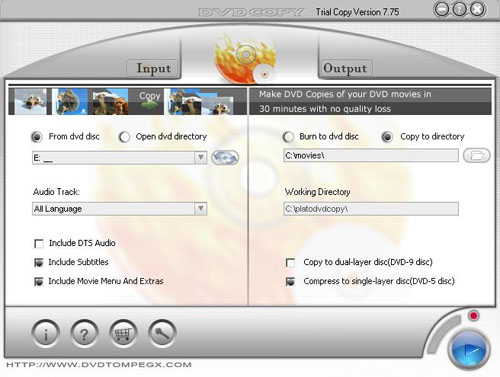
Select Source DVD Movie
(1)if you want to copy a DVD movie from a DVD disc,insert a dvd disc and choose "From dvd disc",then select the source disc from device list.
(2)if have a dvd movie directory in your hard disk,choose "Open dvd directory", then select source dvd folder.
Select Destination:
(1)if you want to make a copy of DVD disc,choose "Burn to dvd disc",select a dvd recorder from device list and a working folder of hard disk for temporary using.
(2)if you want to make copy of DVD movie to your hard disk(great for laptops),click "Copy to directory",then select destination dvd folder.
Setting the copy type
(1)if you just want to copy specified language audio track select a language from the language list
(1)if you want to copy a DVD movie from a DVD disc,insert a dvd disc and choose "From dvd disc",then select the source disc from device list.
(2)if have a dvd movie directory in your hard disk,choose "Open dvd directory", then select source dvd folder.
Select Destination:
(1)if you want to make a copy of DVD disc,choose "Burn to dvd disc",select a dvd recorder from device list and a working folder of hard disk for temporary using.
(2)if you want to make copy of DVD movie to your hard disk(great for laptops),click "Copy to directory",then select destination dvd folder.
Setting the copy type
(1)if you just want to copy specified language audio track select a language from the language list
Step 3.Setting copy type
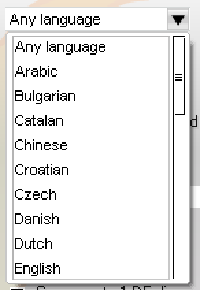
(2)if you want to delete DTS audio of the movie uncheck "Include DTS Audio"
(3)if you don't want to copy subtitle to backup movie uncheck "Include Subtitles"
(4)if you just want to copy main movie to destination uncheck "Include Movie Menu And Extras"
Setting the destination DVD movie Format
(1)Copy D5, D9 DVD movie disc to D9 disc
check "Copy to durl-layer disc(DVD-9 disc)"
(2)Compress D5, D9 DVD movie to one D5 format disc
check "Compress to single-layer disc(DVD-5 disc)"
(3)if you don't want to copy subtitle to backup movie uncheck "Include Subtitles"
(4)if you just want to copy main movie to destination uncheck "Include Movie Menu And Extras"
Setting the destination DVD movie Format
(1)Copy D5, D9 DVD movie disc to D9 disc
check "Copy to durl-layer disc(DVD-9 disc)"
(2)Compress D5, D9 DVD movie to one D5 format disc
check "Compress to single-layer disc(DVD-5 disc)"
Step 4. Start Copying
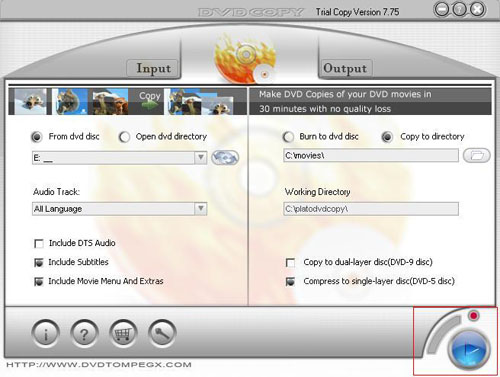
Click "Start" button to start copying.
iOrgSoft DVD Copy Related Software
 iOrgSoft DVD Copy is an easy and practical DVD movie backup software! It allows you to copy DVD movie to ISO image file or DVD folder. It is the best solution to copy protected DVD to computer, removing the protections easily while exactly same as the original movie.
Plato DVD Copy backup your own favorite DVD movies to new copy for saving original disc with no quality loss! the same as original disc, support play in home dvd player and computer dvd player.
Wondershare DVD Copy for Mac OS can Copy D9 and D5 DVD movies ( D9 to D9 and D5 to D5). Copy DVD with the original quality 100% preserved. Copy DVD to a new DVD disc or a folder on your computer.
iSkySoft DVD Copy for Mac is a powerful Mac DVD copy software, DVD backup, Mac DVD burner that can copy DVD movies(D9 to D9,D5 to D5) with the entire movie in 1:1 ratio perfectly.
AVS DVD Copy is a most convenient and demanded software to make DVD copies, create DVD discs for home DVD Players and perform other burning tasks.
BlindWrite CD and DVD copy Copy, backup and burn your CDs and DVDs. The best money saving backup software on the market.
iOrgSoft DVD Copy is an easy and practical DVD movie backup software! It allows you to copy DVD movie to ISO image file or DVD folder. It is the best solution to copy protected DVD to computer, removing the protections easily while exactly same as the original movie.Plato DVD Copy backup your own favorite DVD movies to new copy for saving original disc with no quality loss! the same as original disc, support play in home dvd player and computer dvd player.Wondershare DVD Copy for Mac OS can Copy D9 and D5 DVD movies ( D9 to D9 and D5 to D5). Copy DVD with the original quality 100% preserved. Copy DVD to a new DVD disc or a folder on your computer. iSkySoft DVD Copy for Mac is a powerful Mac DVD copy software, DVD backup, Mac DVD burner that can copy DVD movies(D9 to D9,D5 to D5) with the entire movie in 1:1 ratio perfectly.AVS DVD Copy is a most convenient and demanded software to make DVD copies, create DVD discs for home DVD Players and perform other burning tasks. BlindWrite CD and DVD copy Copy, backup and burn your CDs and DVDs. The best money saving backup software on the market.
iOrgSoft DVD Copy Related Guides and tutorials
How to Copy DVD Movies on Mac OS X?
How to Backup DVD, Clone DVD, Copy DVD, Burn DVD between DVD-9 and DVD-5?
How to Copy Dual-layer DVD 9 Movie, Single-layer DVD 5 Movie to WMV, MP4, MP3,AAC, or WAV?
How to Make copies of your DVD Movies?
How to copy protected DVD movie to PC and rip DVD?
How to copy DVD to DVD and Shrink DVD9 to DVD5?
How to Copy DVD Movies on Mac OS X?
How to Copy DVD Movies on Mac OS X? How to Backup DVD, Clone DVD, Copy DVD, Burn DVD between DVD-9 and DVD-5? How to Copy Dual-layer DVD 9 Movie, Single-layer DVD 5 Movie to WMV, MP4, MP3,AAC, or WAV? How to Make copies of your DVD Movies? How to copy protected DVD movie to PC and rip DVD? How to copy DVD to DVD and Shrink DVD9 to DVD5? How to Copy DVD Movies on Mac OS X?